
Someone searches on their phone for a service nearby, sees a handful of results, and taps on one of them. From that moment on, it no longer matters how well you are found, but what that person finds in your profile. And whether they get an answer to their actual question there. How a Google Business Profile turns into customer inquiries is decided in these few seconds.
At a glance
- Visibility and inquiries are two separate challenges: many profile views do not yet mean a single call.
- A call that goes unanswered does more damage than a missing call button, because it costs trust.
- If your profile shows you are open on a public holiday, someone will drive there for nothing and often leave a bad review afterwards.
- Place the pin on the driveway and name services individually using your customers' own words.
- The messaging function is a promise to respond; without a designated person in charge, you are better off leaving this channel off.
Many businesses work on their visibility and overlook the step that follows. A profile can have many views and still trigger hardly any calls. The phone number is outdated, opening hours are wrong on public holidays, or the service someone searched for is nowhere to be found. Such gaps do not cost you visibility; they cost you orders. And they can usually be closed in half an hour.
Why a Google Business Profile needs customer inquiries, not just views
Google names three factors for which businesses appear in local search. Relevance, distance, and prominence determine whether your profile is displayed at all. They say nothing about the step that follows. Whether someone calls, gets directions, or opens your website depends entirely on the content of your profile.
The distinction is important because both areas require different work. You improve visibility via categories, reviews, and consistent data; how to proceed with this is covered in our article on levers for a better Google Maps ranking. Inquiries arise differently, namely when your profile is complete and clear. For a Google Business Profile to trigger customer inquiries, you need both. Anyone who only pays attention to findability is polishing the door while forgetting the room behind it.
Let’s do the math with hypothetical numbers for illustration purposes. Your profile gets 400 views in a week and triggers 8 calls. If clear service descriptions and correct opening hours lead to 12 calls, that is 50 percent more inquiries without a single additional view. No other lever works so quickly and costs so little.
The four actions your customers can trigger in the profile
At its core, a business profile offers four actions. Everything else in it serves to make one of these four more likely. Therefore, do not judge your profile as an overall picture, but go through the four actions individually. Does each one lead to the goal, even if someone taps it on a Sunday at 7 PM?
The four are not of equal value. A phone call is usually the most direct inquiry, route planning is the clearest buying intent for physical stores, and a website click is the beginning of a longer research process. Nevertheless, they all must work. You never know in advance which path the next person will choose.
Calling
The stored number must lead to a device that is actually manned. Is it still correct, and does someone pick up while your profile says you are open? If you are often unable to answer the phone at the business, you are better off using a mobile number than an unanswered landline. A call that goes unanswered does more damage than a missing call button, because it costs trust.
Planning a route
Here, the accuracy of the address and the map pin counts. Place the pin on the driveway, not the middle of the building. If your entrance is in the courtyard, the shop is on the first floor, or the access road is only from one side, write that in the description and show it in a photo. Parking options are also a deciding factor for many people; there are attributes for this.
Opening the website
The website link should lead to where the search leads. If someone is looking for a specific service and arrives on the general home page, they have to search again, and some people won't do that. For multiple locations, every profile points to its own location page. Also, look at the landing page on your mobile phone. Phone number and inquiry form should be accessible without scrolling.
Sending a message
Of the four actions, this is the only one you are better off switching off if you cannot service it. Anyone who opens this channel is promised a response. How to handle this is explained in a separate section below.
However, one of these four actions is only triggered if all questions in the customer's mind have been answered beforehand. Six elements of your profile do this work. The following overview contrasts each element with the question it answers and the to-do necessary for it.
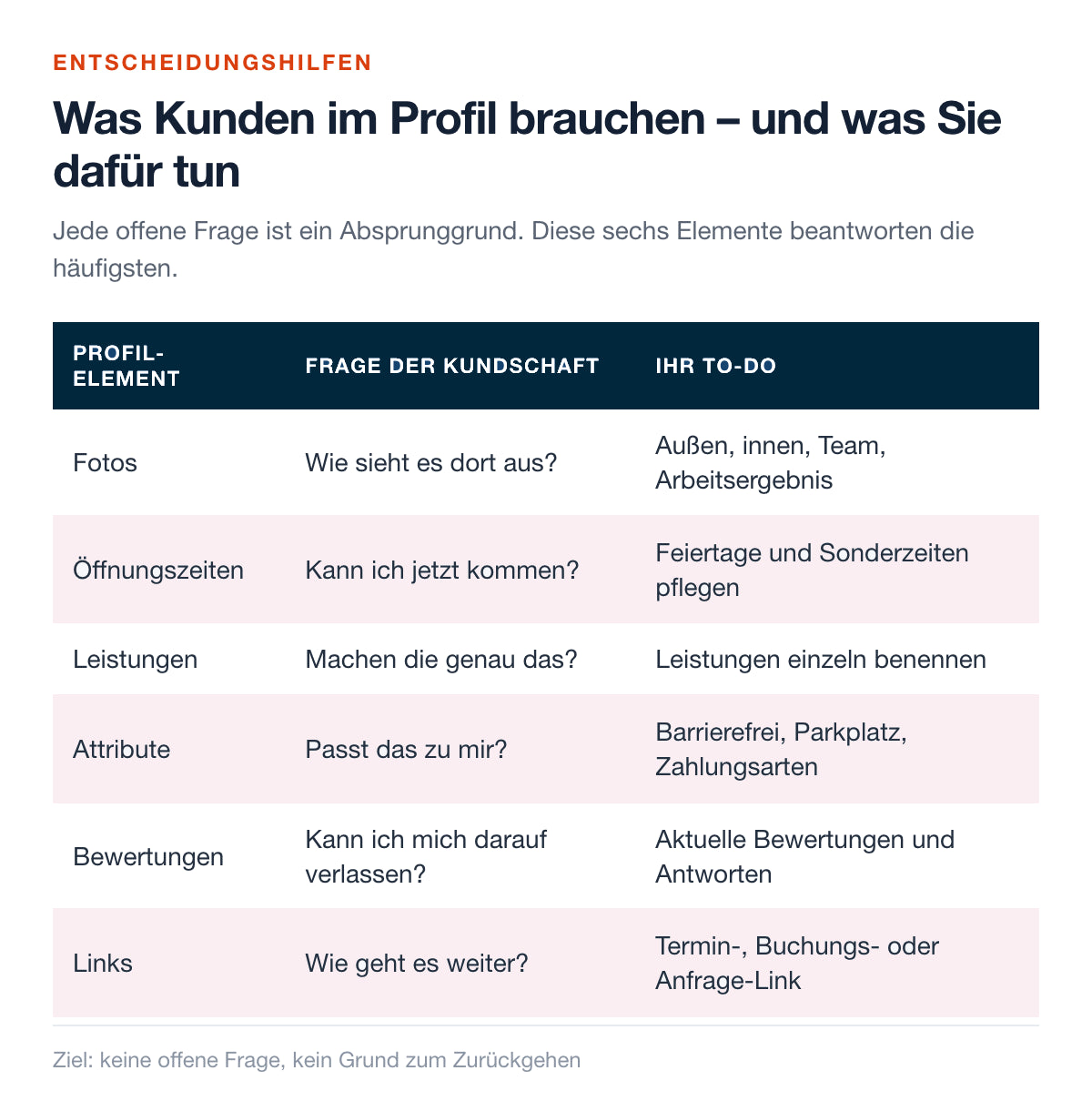
The footnote of the overview summarizes the goal. No open questions, no reason to go back. If someone returns from your profile to the result list, a piece of information was missing, and this very return is the actual loss, because there are two competitors right below you. Work through the six elements in the order they appear here. It roughly corresponds to the order in which people view a profile.
The six elements that answer open questions
These six points are not an exercise in completeness; they answer specific questions. If you are unsure whether a piece of information is necessary, formulate the question your customer would ask. If your profile does not answer it, the information is missing. How to set up the profile fundamentally, including categories and description, is shown in the 12-point checklist for optimizing the business profile.
Take on the elements individually and implement the to-do for each instead of tackling everything at once. This is faster overall, and you will see later which change had an effect.
Photos: What does it look like there?
People want to know where they are going before they arrive. For starters, four motifs are sufficient: the exterior view with a recognizable entrance, the interior, the team, and a work result. The most important is the exterior view, as it provides recognition upon arrival. Photograph in daylight and without filters. How to keep photos and posts permanently up to date is described in the article on how to keep your business profile active.
Opening hours: Can I come now?
Most people keep standard hours up to date. Profiles differ when it comes to holidays and special hours. Enter holidays in advance, as well as company holidays, inventory days, and shortened hours. If your profile shows you are open on a public holiday, someone will drive there in vain and often write a bad review afterwards, which is justified in terms of content. Two fixed dates in the calendar per year are enough to avoid this.
Services: Do they do exactly that?
Name your services individually, using your customers' words. Not "Repairs," but the specific jobs you actually offer. This has a dual effect. It answers the question of whether you do the right thing, and it provides Google with usable terms. Where a service needs explanation, write two sentences about it. And if you often receive the wrong inquiries because of it, also mention what you do not offer.
Attributes: Does it fit me?
Attributes are selection fields, and they remove small but decisive hurdles. These include wheelchair accessibility, parking, accepted payment methods, outdoor seating, and Wi-Fi. For some of your customers, one of these is the condition of all conditions. Maintain the fields carefully once and only look at them again if something changes. Only set attributes that actually apply.
Reviews: Can I rely on it?
Reviews answer the question of trust. More important than the average is how recent they are and whether you respond. A profile with fresh reviews and factual answers appears managed. How many reviews make sense for your case is calculated in the article on the star average and the necessary number of reviews. In any case, ask all customers equally, without incentives and without pre-selecting the satisfied ones, as Google's guidelines prohibit both. The easiest way is with a device or card that is handed over in conversation, such as an NFC review stand for counter and table.
Links: What happens next?
Finally, a next step is needed. If your business works with appointments, provide an appointment, booking, or inquiry link. It is important for everyone who cannot or does not want to talk on the phone right now. Make sure it leads directly to the form or calendar and not to a page from which you first have to search further.
Switch on the messaging function only with a promise to respond
For people with a quick question who do not want to call, this channel is convenient. That is exactly why expectations are high. Those who write expect an answer within a few hours, not days. If it doesn't come, the inquiry goes elsewhere, and in the worst case, a review about your accessibility is created.
So decide consciously. Only switch the function on if a named person on the team has the notifications on their phone and can react during your working hours. Set two to three standard answers, namely a receipt confirmation with a time indication, a follow-up question for missing information, and a reference to the phone if things get complicated. Keep sensitive data out of the channel; for quotes, switch to email or phone.
If there is no one reliably in charge, leave the function off. A profile without a message button is coherent. A message button without a response is a mistake you built in yourself.
Practical tip
Set a response time that you can meet even on a busy day, e.g., "within one business day," and formulate your receipt confirmation exactly like that. A kept promise of four hours is better than a broken one of one hour.
Where prospects drop off and how to recognize it
Your business profile keeps statistics on its own performance. They show, among other things, which search terms people used to find you, how often the profile was viewed, and how many calls, route requests, and website clicks resulted from it. The labels and layout of this view change from time to time. The mindset behind it remains the same.
Do not read the numbers as a grade, but as an indication of a gap. We see three patterns repeatedly in practice. Many views and few actions suggest that information is missing, usually photos, services, or current reviews. Many website clicks and few inquiries shift the problem to the landing page, away from the profile. And if services appear in the search terms that you have not listed, it is a request to enter them.
Note the current values before every change and check again four weeks later. Without this starting point, you will not recognize any effect. Anyone managing multiple locations quickly loses track of this manual work; the reputation management from shoptimizer bundles these reports in one place.
A walkthrough of your own profile
The most effective test takes ten minutes. Take your phone, log out of your Google account, or open a private window, and then search as a stranger would, i.e., with service and location instead of your company name. Note down what catches your eye without correcting it immediately.
Go through the walkthrough in this order and answer each question with Yes or No. Every No is a task for this week.
- Does your business appear at all when searching for service and location?
- Does the first screen say what you do and where you are without scrolling?
- Is the correct opening time visible today, even on holidays?
- Does the right device ring when you call yourself via the call button?
- Does the route lead to the driveway and not the back?
- When you tap the website link, do you land on an appropriate page?
- Can you find the entrance, the interior, and a work result in the photos?
- Is the service you searched for listed verbatim?
- Are the latest reviews current and answered?
- Is there a visible next step for the appointment or the inquiry?
Repeat the walkthrough twice a year, and additionally whenever something changes in the business, i.e., new service, new number, new hours, new entrance. Also, ask someone who doesn't know your business to do the same and say out loud what remains unclear to them. These fresh eyes find more in five minutes than you do in an hour because you have long since supplemented your own profile with your knowledge without realizing it.
Inquiries arise where no question remains unanswered.
shoptimizer provides the haptic review tools for everyday use and a dashboard that bundles reviews, response suggestions, and reports in one place – even across multiple locations.
Test for free now →Frequently Asked Questions (FAQ)
Why am I not getting inquiries even though my profile is often displayed?
Usually, a piece of information necessary for the decision is missing. This is often missing photos of the entrance, services not listed individually, outdated opening hours, and reviews older than a year. Go through the six elements: photos, opening hours, services, attributes, reviews, and links, one by one. Visibility and inquiries are two separate challenges.
Which details are most important for inquiries?
An reachable phone number, correct opening hours including holidays, and individually named services work fastest because they answer the most frequent questions. Next come photos of the entrance and current reviews with answers. Attributes like parking or wheelchair accessibility only concern a part of the customers, but there they decide everything.
Should I activate the messaging function?
Only if a named person receives the notifications and can respond during your working hours. The function is a promise to respond. If a message is left pending, you lose the inquiry and risk a review about your accessibility. Without a designated person in charge, you are better off leaving the channel off and clearly offering telephone and inquiry forms.
Where should the website link in the profile lead?
To the page that fits the search. For one location, this is usually the home page, provided it shows services, address, and phone number immediately. For multiple locations, every profile points to its own location page. Look at the landing page on your mobile phone. Contact options and services should be visible without long scrolling.
How quickly do changes to the profile take effect?
Opening hours or photos usually appear at short notice; some details are checked beforehand and take longer. For the effect on inquiries, count on a few weeks and compare your profile statistics with the period before. Note the initial values, otherwise you will not recognize the connection later.
Note: The labels and arrangement of functions in the Google Business Profile change from time to time. When in doubt, check the current interface and Google's guidelines for reviews. This article does not constitute legal advice.
AI tools were used for this article. Content and sources were edited and verified.


